
1. Who is the SHIFT project for?
The SHIFT project will bring one Integrated Work Management System for all UMD facilities teams to share. UMD facilities teams include Facilities Management & Division of Student Affairs (Department of Residential Facilities, Dining Services, Stamp, RecWell)
2. How do I ask questions?
Click here to contact us with a question. Your question could appear on this website!
3. What are the specific functions of all modules?
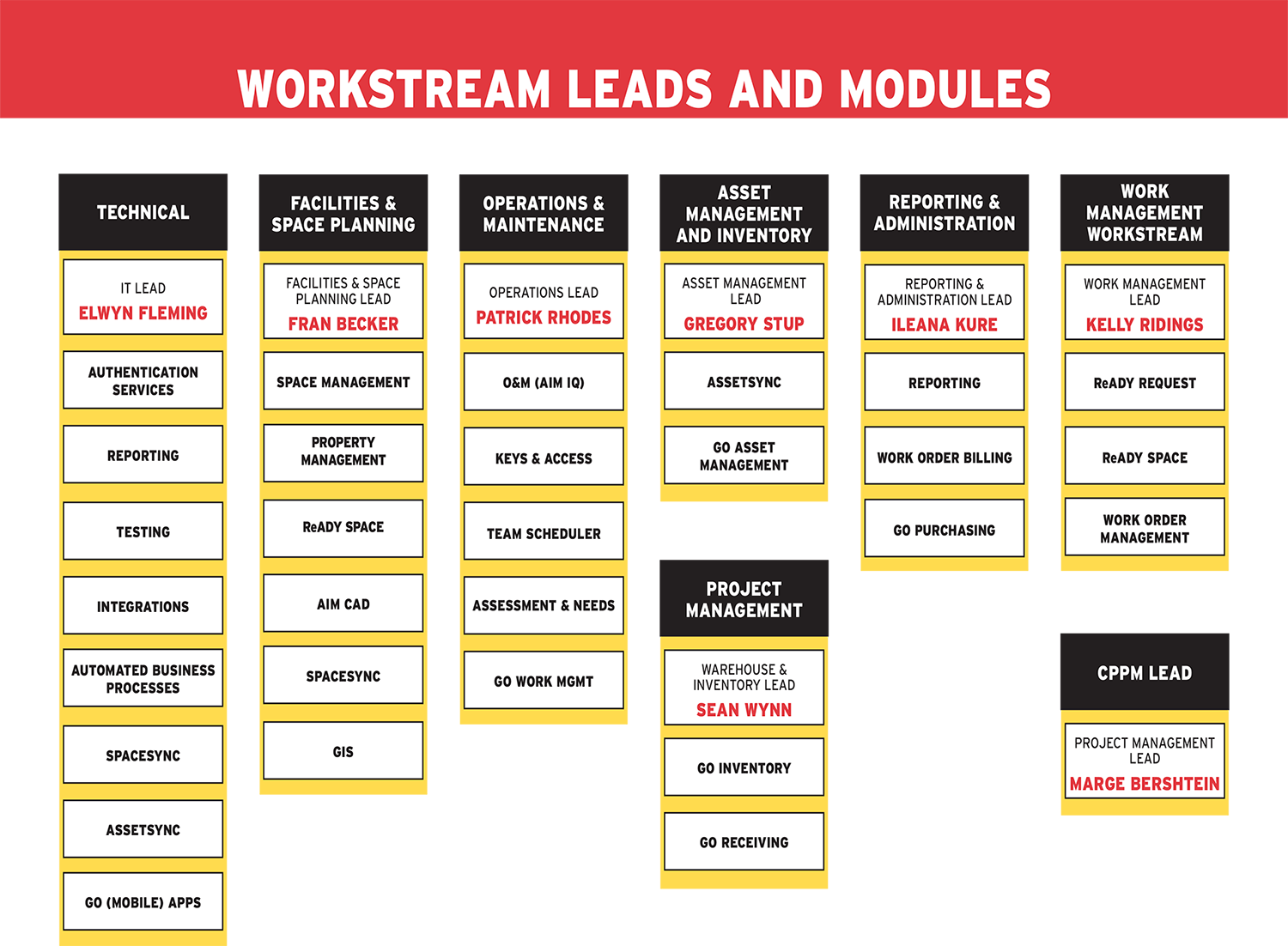
4. What existing information will be saved and migrated to the new AssetWorks system?
Generally, critical business and operational information will be saved from all current work management systems and placed into a data warehouse. We have been working with all key stakeholders on determining what information needs to be maintained and what information can be deleted.
We anticipate that any current work tickets and projects will be migrated to the new AssetWorks system, however details will be determined during the future state process design sessions for each module. O&M Business Process Analysis will occur Winter 2022-23. AiM Space & Property Management will occur Spring 2023.
5. Will we be able to customize the new AssetWorks system to meet my team's needs?
In general, the team will work to utilize out-of-box (OOB) functionality for the AssetWorks implementation with very limited customization. We need to keep in mind that an out-of-box implementation brings with it industry best practices. While our jobs will not change, our process for interacting with AssetWorks may look and feel different from the way we interact with our current work management tools.
In the event that there is a customization required, it will be submitted and processed through our governance structure before the implementation team can begin work. Customizations will be limited to areas where there is a state policy or guideline that must be maintained.
6. How will AssetWorks get information and data from our current work management systems to begin setting up our new implementation, and who will provide it?
AssetWorks will provide a data template for our IT Workstream team to fill out to ensure a smooth import to the new system. This template will tell our IT teams what data and information needs to be pulled from our current systems and in what format. This process will likely require data cleaning and normalization due to the differences in naming conventions between the old systems and our new AssetWorks system.
7. How can I get involved if I want to find out more? Will there be product demos available?
There will be many opportunities for staff to participate in demonstrations, testing and training sessions. In addition, you may be a staff person who can provide some specific knowledge to the implementation of our new system. If you are or if you’d just like to get involved, please let us know by emailing us.
8. How will I be able to access AssetWorks? My current system has limitations on when and how I can access it.
AssetWorks is a SaaS (software as a service) system and can be reached from any device with an internet connection and browser. There is also a downloadable app version of the system which is accessible via Apple mobile devices.
9. Will this downloadable app be required?
No. Users may access the system by using a browser and internet connection.
10. How do facilities staff request service from the field?
Currently, requesting service from the field or getting a new work ticket or service request in the field can be challenging. Many of our devices don’t allow for easy viewing in the field, some require a direct connection from a desktop computer, and others are strictly pencil and paper.
Our new AssetWorks system can be used anywhere there is an internet connection or cellular service through the use of a browser or Apple mobile device app.
11. How can our customers access the system, and will they be able to see the progress made on their requests?
Yes. Customers will have the ability to see the progress made on their requests.
When anyone from UMD visits the ReADY Request customer portal, they can use CAS login protocol to submit a request. Permissions for various levels of detail will be determined based on a user’s HR profile. The ReADY Request customer portal will display different work requests or needs depending on the user. For example, a staff member in an administrative role may be able to request more services than a faculty member or student.
In addition, all customers will be able to see the progress of their request, with real-time status updates from submission through completion. This will provide a transparent and customer-focused user experience.
Role-based permissions and security filters will provide the level of access to data needed by each type of user.
12. Does the iOS app allow customers to use the app to log tickets? For example, could a student in a residence hall take a photo of a problem and attach it to a request?
Yes and yes! ReADY Request customer web portal or app allows requesters to submit requests and attach photos from a mobile device to support their request.
13. What accessibility options are there?
Our exciting new Assetworks workplace management system will have many new accessibility features including:
- Services in multiple languages
- Talk to text functionality
- The web-based version and mobile app are both ADA compliant
14. What devices and technology do I need to ensure that AssetWorks works in the field?
The type of device needed for your work, whether it’s a laptop, tablet or mobile phone will be determined based on your need and the business needs and decisions of your unit. AssetWorks technology will work on all devices.
AiM, the core web application used by most staff responding to service requests across campus, is accessible on any device that supports a modern web browser (Chrome, Firefox, Edge, Safari). Being a web app, no special device is needed.
ReADY Request customer portal is also a web application. ReADY utilizes responsive design, meaning that it scales to the screen size of the device being used.
The AssetWorks suite of mobile apps is designed for Apple iOS only at this time.
15. What does the integration between Workday and AssetWorks look like?
WorkDay and AssetWorks WILL integrate with each other. Our guiding principle is to house all facilities data in AssetWorks and all financial data in WorkDay. The specific integration points between Workday and AssetWorks will be determined during our future state design sessions.
16. When will the integration between Workday and Assetworks take place?
Workday is scheduled to go live on July 17, 2023. The integration process with Assetworks will occur after the Elevate team has concluded a 90 day period of ‘hypervigilance’. This is a recommended strategy for the implementation of any major software release.
Given Workday’s July 17 go-live date, the SHIFT team is planning to begin integration activities between AssetWorks and Workday in the Fall of 2023. The integration process will take several months of discussion, configuration, and testing.
17. What is the time commitment for Workstream Leads?
We anticipate that our Workstream Leads will be dedicating an average of 50% of their time to this project. This can vary from 10% to 90% depending on where we are in the schedule.
18. What is the time commitment for Subject Matter Experts (SMEs)?
The time commitment for Subject Matter Experts (SMEs) will vary greatly depending on the needs from each Workstream Lead. Workstream Leads will participate in discussion and design of the processes that will be implemented for all facilities related organizations at UMD.
It is important to note that the more participation we have from staff now, the better our future tool will become.
19. When will AssetWorks go live?
Phase 1 is targeted to go live in June 2024. Phase 1 includes Operations & Maintenance, Space and Planning, ReADY Request (the customer facing portal), and Keys & Access
Phase 2 includes Capital Planning and Project Management. Specific dates for Phase 2 have not yet been released.
20. How will additional resources (people, equipment, money) be funded/provided?
Requests for additional resources should be routed through your respective department heads.
21. Will individual units need to adjust their budgets to accommodate the additional resources?
This is likely and all additional budgets should be routed through your respective department heads.